 GMB Radar
White-Label Local SEO Reports for Agencies
Create professional white label local SEO reports with GMB Radar. Track Google Maps rankings, Google Business Profile visibility, local keywords, locations, competitors, and ranking changes, then share your results using your own agency branding.
GMB Radar connects local rank tracking with client reporting, giving agencies, consultants, and SEO professionals a practical way to monitor local search performance and present clear, branded results to clients.
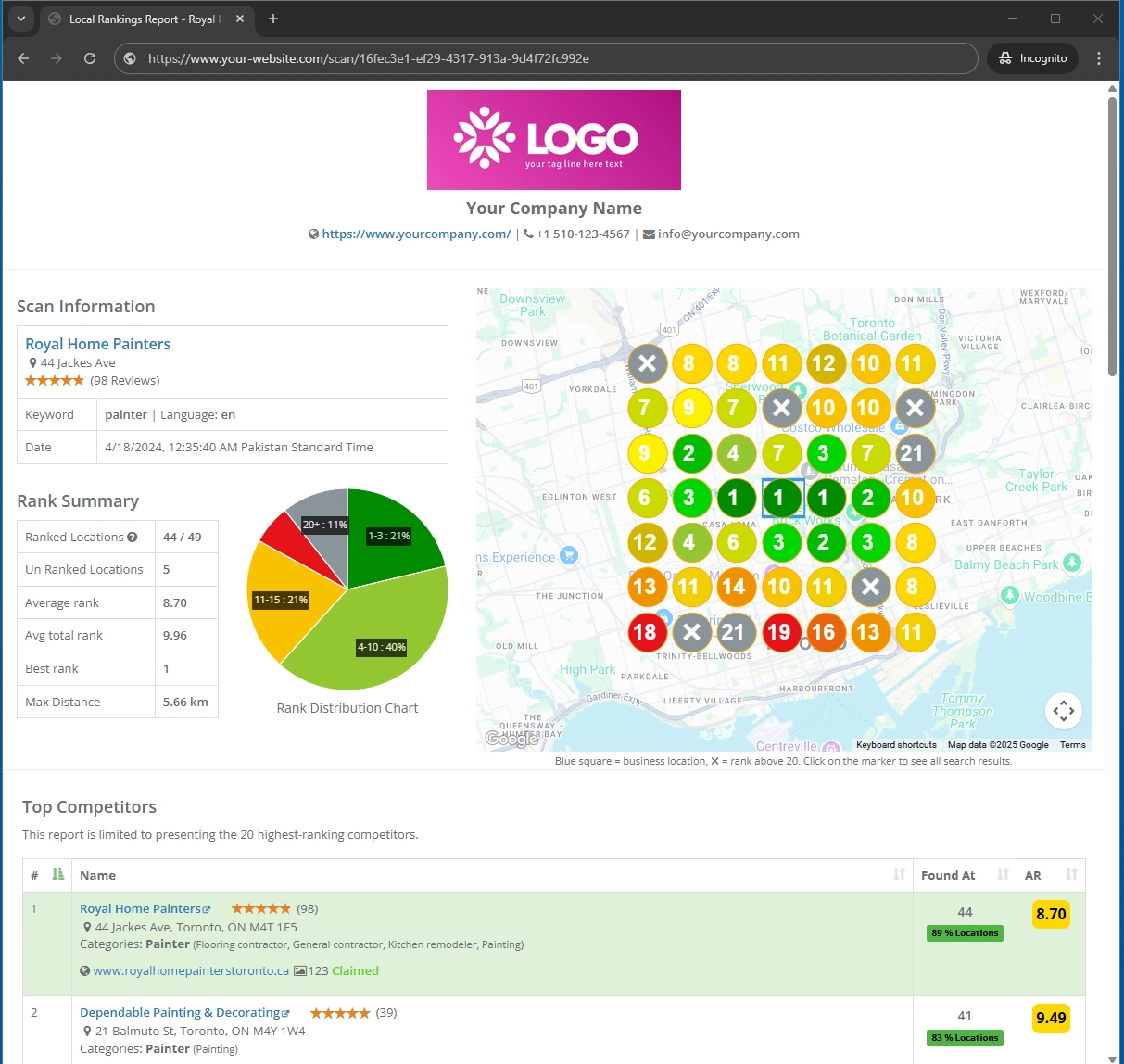
Create Branded Local SEO Reports for Your Clients
Turn your local ranking data into professional, client-ready reports with your agency's business name, website, contact information, and logo. Share or embed branded reports to present local SEO performance clearly to your clients.
Turn Local Ranking Data Into Professional SEO Reports
Local SEO isn’t just about Map Pack visibility or website rankings – it’s about how both work together to drive traffic and leads.
Effective local SEO reports should show more than a single ranking number. Clients need to understand where their business appears in local search, which keywords are being tracked, how rankings change across locations, and how competitors are performing.
GMB Radar lets you build your reporting workflow around actual local ranking data. Add a business, create a scan, select the keywords and locations you want to monitor, review the ranking results, compare competitors, and use the collected data for client reporting.
With white label local SEO reports, you can present this information under your agency's branding instead of making clients focus on the third-party tool behind the data.
How GMB Radar Creates White Label Local SEO Reports
GMB Radar keeps local rank tracking and reporting connected in one workflow. Instead of manually checking Google Maps rankings and building spreadsheets for every campaign, you can manage the tracking process from your GMB Radar account.
Create Your GMB Radar Account
Sign up for GMB Radar to access the local rank tracking tools and manage your businesses, ranking scans, and reports from one dashboard.
Add Your Google Business Profile
Add the Google Business Profile you want to monitor so you can track its local search visibility for your target keywords and locations.
Create a Local Ranking Scan
Choose the keywords and locations you want to target, then create a scan to collect local ranking data for the business.
Configure Your White-Label Branding
Open the White Label settings in your account. Add your business name, website, phone number, logo, and other supported details, then enable white-label reporting.
Open Your Completed Scan Report
Once the scan finishes, open its report to review the collected local rankings and other available ranking data before sharing it with your client.
Share Your Branded Report
Click Share on the scan report to generate a shareable report link. When white-labeling is enabled, the report displays your own branding and is hosted on a separate domain without GMB Radar branding.
White-Label Google Maps Ranking Reports
Track Google Maps Rankings
GMB Radar's local rank tracking lets you monitor Google Maps rankings from selected locations. This provides location-based ranking information rather than relying only on a single city-level ranking.
Build Location-Based Reports
Your Google Maps ranking reports can therefore be built around the actual locations and keywords being monitored for the campaign.
Understand Local Visibility
Review how a business appears in local search across the areas it serves, and use ranking results to explain visibility to clients.
Include Competitor Rankings in Your Local SEO Reports
A client's ranking becomes more meaningful when you can compare it with the businesses competing for the same local searches. GMB Radar provides competitor ranking information within its local scan reports, allowing you to analyze businesses appearing for the tracked keywords and locations.
Use Competitor Data to Identify
- Businesses appearing above your client
- Keywords where competitors have stronger local visibility
- Changes in competitor rankings
- Local ranking gaps
- Areas where additional local SEO work may be required
Adding competitor information to a local SEO report gives clients more context around their search performance.
Share White Label SEO Reports With Clients
Once your local ranking scan is complete, GMB Radar provides options for sharing and downloading the resulting report.
You can use your reports for regular client communication, campaign reviews, ranking updates, and local SEO performance discussions.
Use White Label Reports For
- Monthly local SEO reporting
- Google Maps ranking updates
- Local search performance reviews
- Competitor ranking analysis
- SEO campaign progress reporting
- Client presentations
- Internal SEO analysis
Embed White Label Local SEO Reports on Your Website
GMB Radar provides a report URL that can be embedded into your own website. This gives agencies another way to present branded local ranking information through their existing website experience.
Instead of manually rebuilding ranking tables for every client, you can use the available report URL to display the relevant local SEO reporting information.
What Can You Include in a Local SEO Report?
Your reports can include the ranking information collected through your GMB Radar scans.
- Business ranking information
- Google Maps and local rankings
- Tracked keywords and locations
- Competitor ranking information
- Grid position map
White Label Local SEO Reports for Agencies and SEO Professionals
GMB Radar is useful for agencies, freelancers, consultants, and SEO professionals who need to monitor local search rankings and present those results to clients.
For Local SEO Agencies
Manage client campaigns, track local rankings, monitor competitors, schedule recurring scans, and deliver branded SEO reports.
For SEO Consultants
Analyze local ranking trends, identify improvement opportunities, and provide clients with professional white-label SEO reports.
For Freelance SEO Professionals
Track client rankings across target locations, demonstrate SEO progress, and deliver professional reports that showcase your work.
For Multi-Location Businesses
Compare Google Maps rankings across business locations, identify visibility gaps, and monitor performance in each target market.
Explore More GMB Radar Tools
More tools to track rankings and improve local SEO performance.
Any questions?
Check out the FAQs
Learn how to set up white-label branding, share reports, and present local SEO results under your own brand.
Contact supportLog in to your GMB Radar dashboard and navigate to Account → White Label from the menu. On the White Label settings page, you can enable or disable branding, enter your company name, website, phone number, and email address, and select your company logo.
Once configured, your company information and logo will appear on your white-label reports and report URL, allowing you to present local SEO ranking data under your own brand.
Log in to your GMB Radar dashboard and open any scan report. Click the Share button to generate a public link that you can share with your clients. Anyone with the link can open the report without needing access to your dashboard.
If white-label branding is enabled in your account settings, the shared report will display your company's branding. You can also download the report as a PDF, which will include your branding as well.
Yes. You can use the public report URL to display your ranking reports on your website, allowing clients to view their local SEO performance through your own website experience.
When white-label branding is enabled, your reports display your company's branding instead of GMB Radar branding. You can share the public report URL directly or use it on your website to present ranking data under your own brand.
Your reports can present ranking information collected through your scans, including Google Maps and local rankings, tracked keywords and locations, competitor ranking information, and grid position map results. The exact information available depends on the scan and report you are viewing.